How to check if a cell is empty / blank in Excel
Posted On November 17, 2020
In this post, you will learn how to check for an empty cell.
To check if a cell is empty or blank, we use the isBlank() function
isBlank() function takes a cell address as input and returns true or false.

In the example shown in the screenshot above,
- =isblank(A1) returned FALSE because it contains a label
- =isblank(A2) returned TRUE because it is empty
- =isblank(A3) returned FALSE because it contains a value
In the following example, added a formula at A2, =A3*2 in the cell A4. Note that =isblank(A4) returns FALSE.
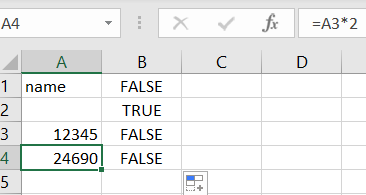
isblank() returns false if a cell contains label, value, or formula.